Disable JavaScript in Adobe
Disable JavaScript on Adobe DC
JavaScript could potentially be used by attackers to manipulate users or to execute undesired code locally. JavaScript is a programming language commonly used to enhance interactivity and functionality in web pages and, to a limited extent, in PDF documents. Disabling JavaScript in Adobe Reader DC protects against potential vulnerabilities and malicious code embedded in PDF documents.
Audit (PowerShell)
Check the status of JavaScript in Adobe Reader DC with PowerShell.
Get-ItemProperty "HKLM:\SOFTWARE\Policies\Adobe\Adobe Acrobat\DC\FeatureLockDown" -Name bJavasScript
If the script returns with the value 0 or Property bJavasScript does not exist, JavaScript is enabled in Adobe Reader DC.
Audit (Adobe Reader DC)
Check the status of JavaScript in Adobe Reader DC via Adobe Reader DC.
- Open Adobe Reader DC.
- Go to the
Editmenu and selectPreferences. - In the Preferences window, select
JavaScriptfrom the categories on the left side. - If the box that says
Enable Acrobat JavaScriptis checked. JavaScript is enabled.
Configuration (PowerShell)
Disable JavaScript in Adobe Reader DC through PowerShell.
Configuration (Adobe Reader DC)
Disable JavaScript in Adobe Reader DC through Adobe Reader DC.
- Open Adobe Reader DC.
- Go to the
Editmenu and selectPreferences. - In the Preferences window, select
JavaScriptfrom the categories on the left side. - Uncheck the box that says
Enable Acrobat JavaScript. - Click
OKto save the changes.
Configuration (Microosft Intune)
Note
Remediations requires users of the devices to have one of the following licenses: Windows 10/11 Enterprise E3 or E5 (included in Microsoft 365 F3, E3, or E5) or Windows 10/11 Education A3 or A5 (included in Microsoft 365 A3 or A5).
Disable JavaScript in Adobe Reader DC with a Remediation package in Microsoft Intune. Disable JavaScript in Adobe Reader DC with a Remediation package in Microsoft Intune. With Remediations in Intune, you create and run script packages on devices to proactively find and fix the top support issues on devices in your organization. For that, we need a detection script and a remediation script.
# Check if Adobe Reader DC is installed
$AdobeReaderDCInstalled = (Test-Path -Path 'HKLM:\SOFTWARE\Policies\Adobe\Adobe Acrobat\DC')
if ($AdobeReaderDCInstalled -eq $true) {
    Write-Output "Adobe Reader DC installation detected on $($env:COMPUTERNAME)"

    # Check if JavaScript is disabled
    $AdobeReaderDCPath = Get-ItemProperty "HKLM:\SOFTWARE\Policies\Adobe\Adobe Acrobat\DC\FeatureLockDown"

    if ($AdobeReaderDCPath.bDisableJavaScript -eq '1') {

        Write-Output "Javascript is disabled on $($env:COMPUTERNAME)."
        exit 0

    }
    Else {
        Write-Output "Javascript is still enabled on $($env:COMPUTERNAME). This poses a security risk."
        exit 1
    }
}
Else {
    Write-Output "Adobe Reader DC is not installed on $($env:COMPUTERNAME)"
    exit 0
}
# Paths
$path = 'HKLM:\SOFTWARE\Policies\Adobe\Adobe Acrobat\DC\FeatureLockDown'

# Disable Javascript in Adobe Reader DC
try {

    New-ItemProperty -Path $path -Name 'bDisableJavaScript' -Value 1 -PropertyType DWord -Force
    exit 0
}
catch {
    $ErrorMessage = $_.Exception.Message
    Write-Output $ErrorMessage
    exit 1
}
- Login into the Microsoft Intune admin center (https://endpoint.microsoft.com).
- Select 'Devices'.
- Select
Remediations. - Click on
Create script package. - Fill in the
Namefield and pressNext. - For the
Detection script fileupload DetectionScriptAdobeJavaScript.ps1`. - For the
Remediation script fileuploadRemediationScriptAdobeJavaScript.ps1.
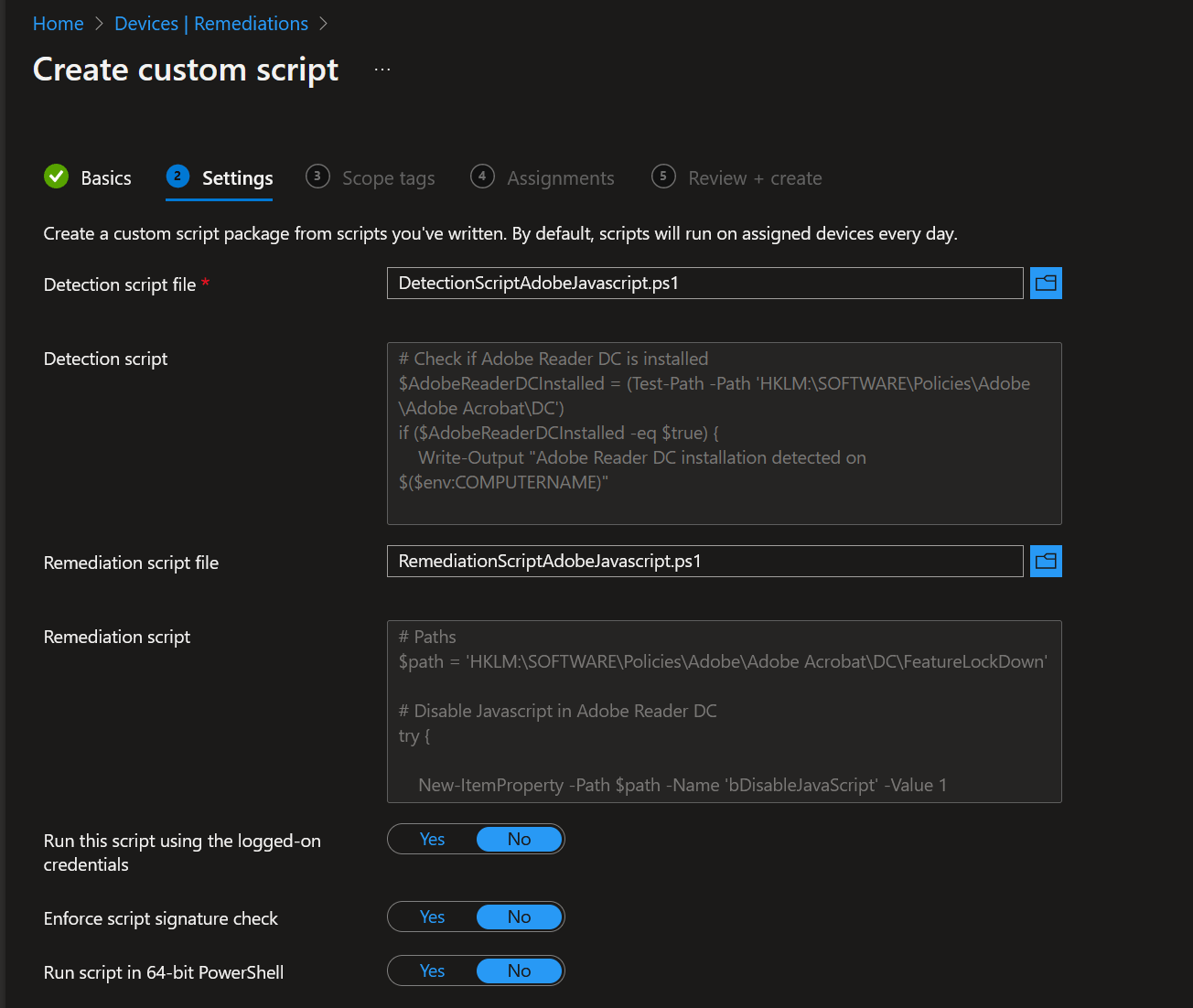
8. Select Next.
Assign this remediation package to a group and wait until this package got picked up by the devices.
Configuration (Group Policy)
- Open the Group Policy Management Console (
gpmsc.msc). - Navigate to
Computer Configuration\Preferences\Windows Settings\Registry. - Right-click on the
Registryand chooseNew --> Registry Item. -
On the screen configure the registry as follows:
-
Action:
Update• Hive:HKEY_LOCAL_MACHINE• Key Path:SOFTWARE\Policies\Adobe\Adobe Acrobat\DC\FeatureLockDown• Value name:bDisableJavaScript• Value type:REG_DWORD• Value data:1• Base:Decimal
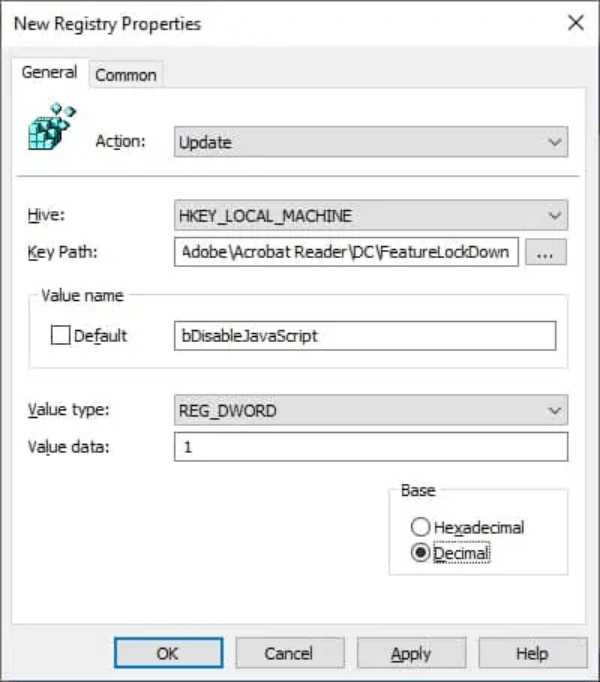
- Press
Apply.
User Impact
Disabling JavaScript may limit certain interactive features in PDF documents, as JavaScript is often used to enable functionalities like form validation, buttons, and multimedia elements.